Search This Blog

Tuesday, November 28, 2006

What is verification & validation?

Q1 What is verification?

Verification ensures the product is designed to deliver all functionality to the customer; it typically involves reviews and meetings to evaluate documents, plans, code, requirements and specifications; this can be done with checklists, issues lists, walkthroughs and inspection meetings. You CAN learn to do verification, with little or no outside help.


Q2 What is validation?

Validation ensures that functionality, as defined in requirements, is the intended behavior of the product; validation typically involves actual testing and takes place after verifications are completed.


Q3 What is a walkthrough?

A walkthrough is an informal meeting for evaluation or informational purposes. A walkthrough is also a process at an abstract level. It's the process of inspecting software code by following paths through the code (as determined by input conditions and choices made along the way). The purpose of code walkthroughs is to ensure the code fits the purpose. Walkthroughs also offer opportunities to assess an individual's or team's competency.


Q4 What is an inspection?

An inspection is a formal meeting, more formalized than a walkthrough and typically consists of 3-10 people including a moderator, reader (the author of whatever is being reviewed) and a recorder (to make notes in the document). The subject of the inspection is typically a document, such as a requirements document or a test plan. The purpose of an inspection is to find problems and see what is missing, not to fix anything. The result of the meeting should be documented in a written report. Attendees should prepare for this type of meeting by reading through the document, before the meeting starts; most problems are found during this preparation. Preparation for inspections is difficult, but is one of the most cost-effective methods of ensuring quality, since bug prevention is more cost effective than bug detection.


Q5 What is quality?

Quality software is software that is reasonably bug-free, delivered on time and within budget, meets requirements and expectations and is maintainable. However, quality is a subjective term. Quality depends on who the customer is and their overall influence in the scheme of things. Customers of a software development project include end-users, customer acceptance test engineers, testers, customer contract officers, customer management, the development organization's management, test engineers, testers, salespeople, software engineers, stockholders and accountants. Each type of customer will have his or her own slant on quality. The accounting department might define quality in terms of profits, while an end-user might define quality as user friendly and bug free.


Q6 What is a Test Case?

A test case is usually a single step, and its expected result, along with various additional pieces of information. It can occasionally be a series of steps but with one expected result or expected outcome. The optional fields are a test case ID, test step or order of execution number, related requirement(s), depth, test category, author, and check boxes for whether the test is automatable and has been automated. Larger test cases may also contain prerequisite states or steps, and descriptions. A test case should also contain a place for the actual result. These steps can be stored
in a word processor document, spreadsheet, database or other common repository. In a database system, you may also be able to see past
test results and who generated the results and the system configuration used to generate those results. These past results would usually be stored in a separate table.


Q7 What is a Test Suite and a Test Script?

The most common term for a collection of test cases is a test suite. The test suite often also contains more detailed instructions or goals for each collection of test cases. It contains a section where the tester identifies the system configuration used during testing. A group of test cases may also contain prerequisite states or steps, and descriptions of the following tests.
Collections of test cases are sometimes incorrectly termed a test plan. They may also be called a test script, or even a test scenario.
A test plan is the approach that will be used to test the system, not the individual tests.
Most companies that use automated testing will call the code that is used their test scripts.


Q8 What is a Test Scenario?

A scenario test is a test based on a hypothetical story used to help a person think through a complex problem or system. They can be as simple as a diagram for a testing environment or they could be a description written in prose. The ideal scenario test has five key characteristics. It is

(a) a story that is
(b) motivating,
(c) credible,
(d) complex, and
(e) easy to evaluate.

They are usually different from test cases in that test cases are single steps and scenarios cover a number of steps. Test suites and scenarios can be
used in concert for complete system tests.

Type of Testing

Acceptance Testing
Testing the system with the intent of confirming readiness of the product and customer acceptance. Acceptance testing, which is a black box testing, will give the client the opportunity to verify the system functionality and usability prior to the system being moved to production. The acceptance test will be the responsibility of the client; however, it will be conducted with full support from the project team. The Test Team will work with the client to develop the acceptance criteria.


Ad Hoc Testing
Testing without a formal test plan or outside of a test plan. With some projects this type of testing is carried out as an adjunct to formal testing. If carried out by a skilled tester, it can often find problems that are not caught in regular testing. Sometimes, if testing occurs very late in the development cycle, this will be the only kind of testing that can be performed. Sometimes ad hoc testing is referred to as exploratory testing.


Alpha Testing
Testing after code is mostly complete or contains most of the functionality and prior to users being involved. Sometimes a select group of users are involved. More often this testing will be performed in-house or by an outside testing firm in close cooperation with the software engineering department.


Automated Testing
Software testing that utilizes a variety of tools to automate the testing process and when the importance of having a person manually testing is diminished. Automated testing still requires a skilled quality assurance professional with knowledge of the automation tool and the software being tested to set up the tests.


Beta Testing
Testing after the product is code complete. Betas are often widely distributed or even distributed to the public at large in hopes that they will buy the final product when it is released.


Black Box Testing
Testing software without any knowledge of the inner workings, structure or language of the module being tested. Black box tests, as most other kinds of tests, must be written from a definitive source document, such as a specification or requirements document.


Compatibility Testing
Testing used to determine whether other system software components such as browsers, utilities, and competing software will conflict with the software being tested.


Configuration Testing
Testing to determine how well the product works with a broad range of hardware/peripheral equipment configurations as well as on different operating systems and software.


End-to-End Testing
Similar to system testing, the 'macro' end of the test scale involves testing of a complete application environment in a situation that mimics real-world use, such as interacting with a database, using network communications, or interacting with other hardware, applications, or systems if appropriate.


Functional Testing
Testing two or more modules together with the intent of finding defects, demonstrating that defects are not present, verifying that the module performs its intended functions as stated in the specification and establishing confidence that a program does what it is supposed to do.


Independent Verification and Validation (IV&V)
The process of exercising software with the intent of ensuring that the software system meets its requirements and user expectations and doesn't fail in an unacceptable manner. The individual or group doing this work is not part of the group or organization that developed the software. A term often applied to government work or where the government regulates the products, as in medical devices.


Installation Testing
Testing with the intent of determining if the product will install on a variety of platforms and how easily it installs. Testing full, partial, or upgrade install/uninstall processes. The installation test for a release will be conducted with the objective of demonstrating production readiness. This test is conducted after the application has been migrated to the client's site. It will encompass the inventory of configuration items (performed by the application's System Administration) and evaluation of data readiness, as well as dynamic tests focused on basic system functionality. When necessary, a sanity test will be performed following the installation testing.


Integration Testing
Testing two or more modules or functions together with the intent of finding interface defects between the modules or functions. Testing completed at as a part of unit or functional testing, and sometimes, becomes its own standalone test phase. On a larger level, integration testing can involve a putting together of groups of modules and functions with the goal of completing and verifying that the system meets the system requirements. (see system testing)


Load Testing
Testing with the intent of determining how well the product handles competition for system resources. The competition may come in the form of network traffic, CPU utilization or memory allocation.


Parallel/Audit Testing
Testing where the user reconciles the output of the new system to the output of the current system to verify the new system performs the operations correctly.


Performance Testing
Testing with the intent of determining how quickly a product handles a variety of events. Automated test tools geared specifically to test and fine-tune performance are used most often for this type of testing.


Pilot Testing
Testing that involves the users just before actual release to ensure that users become familiar with the release contents and ultimately accept it. Often is considered a Move-to-Production activity for ERP releases or a beta test for commercial products. Typically involves many users, is conducted over a short period of time and is tightly controlled. (see beta testing)


Recovery/Error Testing
Testing how well a system recovers from crashes, hardware failures, or other catastrophic problems.


Regression Testing
Testing with the intent of determining if bug fixes have been successful and have not created any new problems. Also, this type of testing is done to ensure that no degradation of baseline functionality has occurred.


Sanity Testing
Sanity testing will be performed whenever cursory testing is sufficient to prove the application is functioning according to specifications. This level of testing is a subset of regression testing. It will normally include a set of core tests of basic GUI functionality to demonstrate connectivity to the database, application servers, printers, etc.


Security Testing
Testing of database and network software in order to keep company data and resources secure from mistaken/accidental users, hackers, and other malevolent attackers.


Software Testing
The process of exercising software with the intent of ensuring that the software system meets its requirements and user expectations and doesn't fail in an unacceptable manner. The organization and management of individuals or groups doing this work is not relevant. This term is often applied to commercial products such as internet applications. (contrast with independent verification and validation)


Stress Testing
Testing with the intent of determining how well a product performs when a load is placed on the system resources that nears and then exceeds capacity.


System Integration Testing
Testing a specific hardware/software installation. This is typically performed on a COTS (commercial off the shelf) system or any other system comprised of disparent parts where custom configurations and/or unique installations are the norm.


Unit Testing
Unit Testing is the first level of dynamic testing and is first the responsibility of the developers and then of the testers. Unit testing is performed after the expected test results are met or differences are explainable / acceptable.


Usability Testing
Testing for 'user-friendliness'. Clearly this is subjective and will depend on the targeted end-user or customer. User interviews, surveys, video recording of user sessions, and other techniques can be used. Programmers and testers are usually not appropriate as usability testers.


White Box Testing
Testing in which the software tester has knowledge of the inner workings, structure and language of the software, or at least its purpose.

Friday, November 24, 2006

Eye Care

This info' is sure to help PC users very much.During a recent visit to an optician, one of my mail friends was told of an exercise for the eyes by a specialist doctor in the US that he termed as 20-20-20." It is apt for all of us, who spend long hours at our desks, looking at the computer screen. I Thought I'd share it with you. 20-20-20

Step I

:-After every 20 minutes of looking into the computer screen, turn your head and try to look at any object placed at least 20 feet away. This changes the focal length of your eyes, a must-do for the tired eyes.

Step II

:- Try and blink your eyes for 20 times in succession, to moisten them.

Step III

:- Time permitting of course, one should walk 20 paces after every 20 minutes of sitting in one particular posture. Helps blood circulation for the entire body.

Circulate among your friends if you care for them and their eyes. They say that your eyes r mirror of your soul, so do take care of them, they are priceless................

Otherwise our eye would be like this.....

Way You Sleep

Back SleeperWith arms and legs spread out:

What a liberty-loving soul! Well, this posture reveals your true identiy. Comfort-lover adn beauty-worshiper, you are also a real spendhrift (but luckily you earn just as much). your other undesirable trait is that you are a bit nosy and seem to enjoy gossiping. Well, who did you mention in your tales lately?

Back Sleeper With legs crossed:

Anyone who sleeps cross-legges is said to be self-obsessed and finds difficulty in accepting changes. Solitude is your priority. Yes your redeeming queality is your ...old for tolerance!

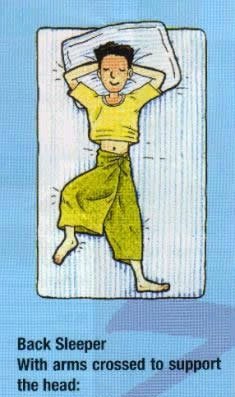
Back Sleeper With arms crossed to support the head:

Your are highly Intelligent and enthusiastic to learn. Yet sometimes you are filled with cranky ideas which people find hard to follow. You take good care of your Family,but the problem is you hardly love anybody. A little bir choosy, Huh?

Tummy Sleeper Sleeping on the Stomach:

If you sleep facedown all night, you are likely to be narrow-minded and Day dreamer. You are probably self- centered and alwasy force people to comply with your own needs. You are also likely to be reckless and desultory. Time to change your sleeping posture?

Side Sleeper Lying on one Side:

This posture indicates that you are a comfident person. You will see success in whatever you undertake, owning to your unrelentless, endeavour. People who sleep on their right side with their right arm stretching over their right arm streching over their head and lying on the right side are said to be blessed with power and fortune.

Side Sleeper Curling up:

Selfish, jealous and vindictive are words that describe you. People arround you got to be careful not to step on your toes as you are easily irritated!

Lying on one Arm:

Contrary to the perivous on (curling up), you are gentle, polite, sisncere, and loving. Well, nothing is perfect. Bulid up your self- confidence and learn to accept mistkes or imperfection. Happiness will then come your way!

Unknown Covering from head to Toe:

You may appear a real macho in Public, but deep down inside your are shy and secrets. If you ecounter any problem, you will rather keep it to yourself and agonise over it than ask for help. No wonder you grimace in your sleep!

Side Sleeper, With one knee bended:

You are inclined to be fussy, always whining and complining. Nervousness is probably your second name. You tense up easily and get overly excited over small matters. Life isn't sucyh a big deal. Learn to Relax.

Unknown Cuddled Up:

You feel lonely and deppressed because you are obsessed with your past failures and setbacks. You are hesitant and indecisive, giving others an impression that love has been missing in your life.

The 7 Dangerous


1* Don't sm0'ke- Experiment from experts proves that sm0'king a cig@rette after meal is comparable to sm0'king 10 cig@rettes (chances of c@ncer is higher).


2* Don't eat fruits immediately - Immediately eating fruits after meals will cause stomach to be bloated with air. Therefore take fruit 1-2 hr after meal or 1hr before meal.


3* Don't drink tea
- Because tea leaves contain a high content of acid. This substance will cause the Protein content in the food we consume to be hardened thus difficult to digest.


4* Don't loosen your belt
- Loosening the belt after a meal will easily cause the intestine to be twisted & blocked.


5* Don't bathe
- Bathing will cause the increase of blood flow to the hands, legs & body thus the amount of blood around the stomach will therefore decrease. This will weaken the digestive system in our stomach.


6* Don't walk about
- People always say that after a meal walk a hundred steps and you will live till 99. In actual fact this is not true. Walking will cause the digestive system to be unable to absorb the nutrition from the food we intake.


7* Don't sleep immediately - The food we intake will not be able to digest properly. Thus will lead to gastric & infection in our intestine.

The Beauty of MAtheMazic

1 x 8 + 1 = 9
12 x 8 + 2 = 98
123 x 8 + 3 = 987
1234 x 8 + 4 = 9876
12345 x 8 + 5 = 98765
123456 x 8 + 6 = 987654
1234567 x 8 + 7 = 9876543
12345678 x 8 + 8 = 98765432
123456789 x 8 + 9 = 987654321


1 x 9 + 2 = 11
12 x 9 + 3 = 111
123 x 9 + 4 = 1111
1234 x 9 + 5 = 11111
12345 x 9 + 6 = 111111
123456 x 9 + 7 = 1111111
1234567 x 9 + 8 = 11111111
12345678 x 9 + 9 = 111111111
123456789 x 9 +10= 1111111111


9 x 9 + 7 = 88
98 x 9 + 6 = 888
987 x 9 + 5 = 8888
9876 x 9 + 4 = 88888
98765 x 9 + 3 = 888888
987654 x 9 + 2 = 8888888
9876543 x 9 + 1 = 88888888
98765432 x 9 + 0 = 888888888


Brilliant, isn't it?
And finally, take a look at this symmetry:


1 x 1 = 1
11 x 11 = 121
111 x 111 = 12321
1111 x 1111 = 1234321
11111 x 11111 = 123454321
111111 x 111111 = 12345654321
1111111 x 1111111 = 1234567654321
11111111 x 11111111 = 123456787654321
111111111 x 111111111=123456789 87654321

Mobile Phone Secrets & Tricks

.:: NOKIA ::.Universal Codes
Code Description :
These Nokia codes will work on most Nokia Mobile Phones
(1) *3370# Activate Enhanced Full Rate Codec (EFR) - Your phone uses the best sound quality but talk time is reduced my approx. 5%
(2) #3370# Deactivate Enhanced Full Rate Codec (EFR) OR *3370# ( Favourite )
(3) *#4720# Activate Half Rate Codec - Your phone uses a lower quality sound but you should gain approx 30% more Talk Time.
(4) *#4720# Deactivate Half Rate Codec.
5) *#0000# Displays your phones software version, 1st Line : Software Version, 2nd Line : Software Release Date, 3rd Line : Compression Type. ( Favourite )
(6) *#9999# Phones software version if *#0000# does not work.
(7) *#06# For checking the International Mobile Equipment Identity (IMEI Number). ( Favourite )
(8) #pw+1234567890+1# Provider Lock Status. (use the "*" button to obtain the "p,w" and "+" symbols).
(9) #pw+1234567890+2# Network Lock Status. (use the "*" button to obtain the "p,w" and "+" symbols).
(10) #pw+1234567890+3# Country Lock Status. (use the "*" button to obtain the "p,w" and "+" symbols).
(11) #pw+1234567890+4# SIM Card Lock Status. (use the "*" button to obtain the "p,w" and "+" symbols).
(12) *#147# (vodafone) this lets you know who called you last.
(13) *#1471# Last call (Only vodofone).
(14) *#21# Allows you to check the number that "All Calls" are diverted to
(15) *#2640# Displays security code in use.
(16) *#30# Lets you see the private number.
(17) *#43# Allows you to check the "Call Waiting" status of your phone.
(18) *#61# Allows you to check the number that "On No Reply" calls are diverted to.
(19) *#62# Allows you to check the number that "Divert If Unreachable (no service)" calls are diverted to.
(20) *#67# Allows you to check the number that "On Busy Calls" are diverted to.
(21) *#67705646# Removes operator logo on 3310 & 3330.
(22) *#73# Reset phone timers and game scores.
(23) *#746025625# Displays the SIM Clock status, if your phone supports this power saving feature "SIM Clock Stop Allowed", it means you will get the best standby time possible.
24) *#7760# Manufactures code.
(25) *#7780# Restore factory settings.
26) *#8110# Software version for the nokia 8110.
(27) *#92702689# Displays - 1.Serial Number, 2.Date Made, 3.Purchase Date, 4.Date of last repair
(0000 for no repairs), 5.Transfer User Data. To exit this mode you need to switch your phone off then on again. (Favourite )
(28) *#94870345123456789# Deactivate the PWM-Mem.
(29) **21*number# Turn on "All Calls" diverting to the phone number entered.
(30) **61*number# Turn on "No Reply" diverting to the phone number entered.
(31) **67*number# Turn on "On Busy" diverting to the phone number entered.
(32) 12345 This is the default security code.


press and hold # Lets you switch between lines

IMEI number: * # 0 6 #
Software version: * # 0 0 0 0 #
Simlock info: * # 9 2 7 0 2 6 8 9 #
Enhanced Full Rate: * 3 3 7 0 # [ # 3 3 7 0 # off]
Half Rate: * 4 7 2 0 #
Provider lock status: #pw+1234567890+1
Network lock status #pw+1234567890+2
Provider lock status: #pw+1234567890+3
SimCard lock status: #pw+1234567890+4

NOKIA 6110/6120/6130/6150/6190
IMEI number: * # 0 6 #
Software version: * # 0 0 0 0 #
Simlock info: * # 9 2 7 0 2 6 8 9 #
Enhanced Full Rate: * 3 3 7 0 # [ # 3 3 7 0 # off]
Half Rate: * 4 7 2 0 #

NOKIA 3110
IMEI number: * # 0 6 #
Software version: * # 0 0 0 0 # or * # 9 9 9 9 # or * # 3 1 1 0 #
Simlock info: * # 9 2 7 0 2 6 8 9 #

NOKIA 3330

*#06# This will show your warranty details *#92702689#
*3370# Basically increases the quality of calling sound, but decreases battery length.
#3370# Deactivates the above
*#0000# Shows your software version
*#746025625#This shows if your phone will allow sim clock stoppage
*4370# Half Rate Codec activation. It will automatically restart
#4370# Half Rate Codec deactivation. It will automatically restart
Restore Factory Settings To do this simply use this code

*#7780# Manufacturer Info Date of Manufacturing *#3283#
*3001#12345# (TDMA phones only) This will put your phone into programming mode, and you'll be
presented with the programming menu.

2) Select "NAM1"
3) Select "PSID/RSID"
4) Select "P/RSID 1"
Note: Any of the P/RSIDs will work
5) Select "System Type" and set it to Private
6) Select "PSID/RSID" and set it to 1
7) Select "Connected System ID"
Note: Enter your System ID for Cantel, which is 16401 or 16423. If you don't know yours, ask your local dealer for it.
8) Select "Alpha Tag"
9) Enter a new tag, then press OK
10) Select "Operator Code (SOC)" and set it to 2050
11) Select "Country Code" and set it to 302 for Canada, and 310 for the US.
12) Power down the phone and power it back on again ISDN Code To check the ISDN number on your Nokia use this code *#92772689#.::

Thursday, November 23, 2006

What is Six Sigma ?

Six Sigma consists of the following phrases:

Define Phase

  • Define customers and requirements
  • Brainstorm: What are the problems of the process?
  • Brainstorm: What are the goals and benefits of the project?
  • Define the measures that you'll use to determine effectiveness of the project.
  • Project Charter: Includes business case, problem and goal statements, project scope, milestones, roles and responsibilities, communication plan.
  • Develop high level process maps for a target process
  • Describes suppliers, inputs, process, outputs and customers./SIPOC

Measure Phase

  • Define defect, opportunity, unit and metrics
  • Develop detailed process map to identify areas where data collection should take place
  • Develop data collection plan
  • Validate measurement system with MINITAB. Link the output here.
  • Collect data, begin developing Y = f(x) relationship using MINITAB. Link the output here.
  • Determine process capability and sigma baseline with MINITAB. Link the output here.

Analyze Phase

  • Define performance objectives
  • Flowchart: Identify value and non-value added process steps
  • Identify source of variation with MINITAB. Link the output here
  • Determine root cause
  • Determine Key input variables and the Y = f(X) relationship between the input and the output variables with MINITAB. Link the output

Improve Phase

  • Brainstorm potential solutions
  • Mapping the potential process
  • DOE planning sheet: Design of experiment
  • Perform design of experiment to try out potential solutions. Link the output here.
  • FMEA: Assess failure mode of potential solutions
  • Pilot study: Collect data from the potential process and analyze them with MINITAB to validate improvement. Link to output here.
  • Correct potential process

Control Phase

  • Collect data and make control charts for key measurements with MINITAB. Link the output here.
  • Calculate process capability with MINITAB. Link the output here.
  • Develop a control plan for on-going improvement
  • Develop transfer plan and handoff to process owner
  • Calculate cost and savings
  • Close project and finalize document.

Windows programming, C++ interview questions

Windows programming interview questions
  1. What are kernel objects? - - Several types of kernel objects, such as access token objects, event objects, file objects, file-mapping objects, I/O completion port objects, job objects, mailslot objects, mutex objects, pipe objects, process objects, semaphore objects, thread objects, and waitable timer objects.
  2. What is a kernel object? - Each kernel object is simply a memory block allocated by the kernel and is accessible only by the kernel. This memory block is a data structure whose members maintain information about the object. Some members (security descriptor, usage count, and so on) are the same across all object types, but most are specific to a particular object type. For example, a process object has a process ID, a base priority, and an exit code, whereas a file object has a byte offset, a sharing mode, and an open mode.
  3. User can access these kernel objects structures? - Kernel object data structures are accessible only by the kernel
  4. If we cannot alter these Kernel Object structures directly, how do our applications manipulate these kernel objects? - The answer is that Windows offers a set of functions that manipulate these structures in well-defined ways. These kernel objects are always accessible via these functions. When you call a function that creates a kernel object, the function returns a handle that identifies the object.
  5. How owns the Kernel Object? - Kernel objects are owned by the kernel, not by a process
  6. How does the kernel object outlive the process that created it? - If your process calls a function that creates a kernel object and then your process terminates, the kernel object is not necessarily destroyed. Under most circumstances, the object will be destroyed; but if another process is using the kernel object your process created, the kernel knows not to destroy the object until the other process has stopped using it
  7. Which is the data member common to all the kernel object and what is the use of it? -
  8. The usage count is one of the data members common to all kernel object types

  9. How to identify the difference between the kernel object and user object? -
  10. The easiest way to determine whether an object is a kernel object is to examine the function that creates the object. Almost all functions that create kernel objects have a parameter that allows you to specify security attribute information.

  11. What is the purpose of Process Handle Table? -
  12. When a process is initialized, the system allocates a handle table for it. This handle table is used only for kernel objects, not for User objects or GDI objects. When a process first initializes, its handle table is empty. Then when a thread in the process calls a function that creates a kernel object, such as CreateFileMapping , the kernel allocates a block of memory for the object and initializes it; the kernel then scans the process’s handle table for an empty entry

  13. Name few functions that create Kernel Objects? - HANDLE CreateThread(…),HANDLE CreateFile(..),HANDLE CreateFileMapping(..)HANDLE CreateSemaphore(..)etcAll functions that create kernel objects return process-relative handles that can be used successfully by any and all threads that are running in the same process.
  14. What is handle? - Handle value is actually the index into the process’s handle table that identifies where the kernel object’s information is stored.
  15. How the handle helps in manipulating the kernel objects? - Whenever you call a function that accepts a kernel object handle as an argument, you pass the value returned by one of the Create* functions. Internally, the function looks in your process’s handle table to get the address of the kernel object you want to manipulate and then manipulates the object’s data structure in a well-defined fashion.
  16. What happens when the CloseHandle(handle) is called? - This function first checks the calling process’s handle table to ensure that the index (handle) passed to it identifies an object that the process does in fact have access to. If the index is valid, the system gets the address of the kernel object’s data structure and decrements the usage count member in the structure; if the count is zero, the kernel destroys the kernel object from memory.
  17. You forget to call CloseHandle - will there be a memory leak? - Well, yes and no. It is possible for a process to leak resources (such as kernel objects) while the process runs. However, when the process terminates, the operating system ensures that any and all resources used by the process are freed—this is guaranteed. For kernel objects, the system performs the following actions: When your process terminates, the system automatically scans the process’s handle table. If the table has any valid entries (objects that you didn’t close before terminating), the system closes these object handles for you. If the usage count of any of these objects goes to zero, the kernel destroys the object.
  18. What is the need of process relative handles? - The most important reason was robustness. If kernel object handles were system-wide values, one process could easily obtain the handle to an object that another process was using and wreak havoc on that process. Another reason for process-relative handles is security. Kernel objects are protected with security, and a process must request permission to manipulate an object before attempting to manipulate it. The creator of the object can prevent an unauthorized user from touching the object simply by denying access to it
  19. How the handles are handled in the child process? - The operating system creates the new child process but does not allow the child process to begin executing its code right away. Of course, the system creates a new, empty process handle table for the child process—just as it would for any new process. But because you passed TRUE to CreateProcess’s bInheritHandles parameter, the system does one more thing: it walks the parent process’s handle table, and for each entry it finds that contains a valid inheritable handle, the system copies the entry exactly into the child process’s handle table. The entry is copied to the exact same position in the child process’s handle table as in the parent’s handle table.
  20. Why the entries in the parent process table and child table are same? - It means that the handle value that identifies a kernel object is identical in both the parent and the child processes.
  21. What about the usage count in the parent child process tables? - The system increments the usage count of the kernel object because two processes are now using the object. For the kernel object to be destroyed, both the parent process and the child process must either call CloseHandle on the object or terminate.
  22. What are Named Objects? - Method available for sharing kernel objects across process boundaries is to name the objects. Below are the kernel named objects 1) mutex, 2) Events, 3) semaphore, 4) waitableTimers, 5)file mapping, 6)job object. There are APIs to create these objects with last parameter as the object name.
  23. What do you mean by unnamed object? - When you are creating the kernel objects with the help of API’s like CreateMutex(, , , ,pzname). And the Pzname parameter is NULL , you are indicating to the system that you want to create an unnamed (anonymous) kernel object. When you create an unnamed object, you can share the object across processes by using either inheritance or DuplicateHandle
  24. What is DuplicateHandle (API)? - Takes an entry in one process’s handle table and makes a copy of the entry into another process’s handle table
  25. What is a thread? - A thread describes a path of execution within a process. Every time a process is initialized, the system creates a primary thread. This thread begins executing with the C/C++ run-time library’s startup code, which in turn calls your entry-point function ( main , Wmain , WinMain , or WWinMain ) and continues executing until the entry-point function returns and the C/C++ run-time library’s startup code calls ExitProcess
  26. What is the limit on per process for creating a thread? - The number of threads a process can create is limited by the available virtual memory and depends on the default stack size
  27. What is Synchronization Objects? - Synchronization object s are use to co-ordinate the execution of multiple threads.
  28. Which kernel objects are use for Thread Synchronization on different processes? - Event, Mutex, Semaphore
  29. What is Event Object and why it is used? - Event is the thread synchronization object to set signaled state or non-signaled state.
  30. What is signaled and non signaled state? - An event is in signaled state means that it has the capacity to release the threads waiting for this event to be signaled. An event is in non signaled state means that it will not release any thread that is waiting for this particular event.example in our project: when user clicks the image application icon double simultaneously. Two image application windows were created. so PAIG created an event and set it to non-signaled state. Then the image application will reset the event to signaled state, after this all the threads are released.
  31. APIs for creating event and set and reset the events - CreateEvent-to create the event OpenEvent – to open already created event SetEvent – to set the event signaled stateRestEvent - To set the Event To non-Signaled State
  32. What is Mutex Object and why it is used? - A mutex object is a synchronization object whose state is set to signaled when it is not owned by any thread, and non-signaled when it is owned. For example, to prevent two threads from writing to shared memory at the same time, each thread waits for ownership of a mutex object before executing the code that accesses the memory. After writing to the shared memory, the thread releases the mutex object.
  33. How do I create a Mutex? - A thread uses the CreateMutex function to create a mutex object. The creating thread can request immediate ownership of the mutex object and can also specify a name for the mutex object
  34. How do other threads own the mutex? - Threads in other processes can open a handle to an existing named mutex object by specifying its name in a call to theOpenMutex - function. Any thread with a handle to a mutex object can use one of the wait functions to request ownership of the mutex object. If the mutex object is owned by another thread, the wait function blocks the requesting thread until the owning thread releases the mutex object using theReleaseMutex - function.
  35. What is semaphores and why it is used? - A semaphore object is a synchronization object that maintains a count between zero and a specified maximum value. The count is decremented each time a thread completes a wait for the semaphore object and incremented each time a thread releases the semaphore. When the count reaches zero, no more threads can successfully wait for the semaphore object state to become signaled. The state of a semaphore is set to signaled when its count is greater than zero, and non-signaled when its count is zero. The semaphore object is useful in controlling a shared resource that can support a limited number of users. It acts as a gate that limits the number of threads sharing the resource to a specified maximum number. For example, an application might place a limit on the number of windows that it creates. It uses a semaphore with a maximum count equal to the window limit, decrementing the count whenever a window is created and incrementing it whenever a window is closed. The application specifies the semaphore object in call to one of the wait functions before each window is created. When the count is zero - indicating that the window limit has been reached - the wait function blocks execution of the window-creation code.


Hardware architecture interview questions


  1. Are you familiar with the term MESI?
  2. Are you familiar with the term snooping?
  3. Describe a finite state machine that will detect three consecutive coin tosses (of one coin) that results in heads.
  4. In what cases do you need to double clock a signal before presenting it to a synchronous state machine?
  5. You have a driver that drives a long signal & connects to an input device. At the input device there is either overshoot, undershoot or signal threshold violations, what can be done to correct this problem?
  6. For a single computer processor computer system, what is the purpose of a processor cache and describe its operation?
  7. Explain the operation considering a two processor computer system with a cache for each processor.
  8. What are the main issues associated with multiprocessor caches and how might you solve it?
  9. Explain the difference between write through and write back cache.
  10. What are the total number of lines written in C/C++? What is the most complicated/valuable program written in C/C++?
  11. What compiler was used?
  12. Have you studied busses? What types?
  13. Have you studied pipelining? List the 5 stages of a 5 stage pipeline. Assuming 1 clock per stage, what is the latency of an instruction in a 5 stage machine? What is the throughput of this machine ?
  14. How many bit combinations are there in a byte?
  15. What is the difference between = and == in C?
  16. Are you familiar with VHDL and/or Verilog?
Tricky C questions

  1. How do you write a program which produces its own source code as its output?
  2. How can I find the day of the week given the date?
  3. Why doesn’t C have nested functions?
  4. What is the most efficient way to count the number of bits which are set in a value?
  5. How can I convert integers to binary or hexadecimal?
  6. How can I call a function, given its name as a string?
  7. How do I access command-line arguments?
  8. How can I return multiple values from a function?
  9. How can I invoke another program from within a C program?
  10. How can I access memory located at a certain address?
  11. How can I allocate arrays or structures bigger than 64K?
  12. How can I find out how much memory is available?
  13. How can I read a directory in a C program?
  14. How can I increase the allowable number of simultaneously open files?
  15. What’s wrong with the call fopen(”c:\newdir\file.dat”, “r”)?
C++ interview questions

  1. What is the difference between an ARRAY and a LIST?
  2. What is faster : access the element in an ARRAY or in a LIST?
  3. Define a constructor - what it is and how it might be called (2 methods).
  4. Describe PRIVATE, PROTECTED and PUBLIC – the differences and give examples.
  5. What is a COPY CONSTRUCTOR and when is it called (this is a frequent question !)?
  6. Explain term POLIMORPHISM and give an example using eg. SHAPE object: If I have a base class SHAPE, how would I define DRAW methods for two objects CIRCLE and SQUARE.
  7. What is the word you will use when defining a function in base class to allow this function to be a polimorphic function?
  8. What are 2 ways of exporting a function from a DLL?
  9. You have two pairs: new() and delete() and another pair : alloc() and free(). Explain differences between eg. new() and malloc()
  10. What is a callback function. Explain in C and C++ and WIN API environment.
  11. (From WINDOWS API area): what is LPARAM and WPARAM?

LoadRunner interview questions

  1. What is load testing? - Load testing is to test that if the application works fine with the loads that result from large number of simultaneous users, transactions and to determine weather it can handle peak usage periods.
  2. What is Performance testing? - Timing for both read and update transactions should be gathered to determine whether system functions are being performed in an acceptable timeframe. This should be done standalone and then in a multi user environment to determine the effect of multiple transactions on the timing of a single transaction.
  3. Did u use LoadRunner? What version? - Yes. Version 7.2.
  4. Explain the Load testing process? -
    Step 1: Planning the test. Here, we develop a clearly defined test plan to ensure the test scenarios we develop will accomplish load-testing objectives. Step 2: Creating Vusers. Here, we create Vuser scripts that contain tasks performed by each Vuser, tasks performed by Vusers as a whole, and tasks measured as transactions. Step 3: Creating the scenario. A scenario describes the events that occur during a testing session. It includes a list of machines, scripts, and Vusers that run during the scenario. We create scenarios using LoadRunner Controller. We can create manual scenarios as well as goal-oriented scenarios. In manual scenarios, we define the number of Vusers, the load generator machines, and percentage of Vusers to be assigned to each script. For web tests, we may create a goal-oriented scenario where we define the goal that our test has to achieve. LoadRunner automatically builds a scenario for us. Step 4: Running the scenario.
    We emulate load on the server by instructing multiple Vusers to perform tasks simultaneously. Before the testing, we set the scenario configuration and scheduling. We can run the entire scenario, Vuser groups, or individual Vusers. Step 5: Monitoring the scenario.
    We monitor scenario execution using the LoadRunner online runtime, transaction, system resource, Web resource, Web server resource, Web application server resource, database server resource, network delay, streaming media resource, firewall server resource, ERP server resource, and Java performance monitors. Step 6: Analyzing test results. During scenario execution, LoadRunner records the performance of the application under different loads. We use LoadRunner’s graphs and reports to analyze the application’s performance.
  5. When do you do load and performance Testing? - We perform load testing once we are done with interface (GUI) testing. Modern system architectures are large and complex. Whereas single user testing primarily on functionality and user interface of a system component, application testing focuses on performance and reliability of an entire system. For example, a typical application-testing scenario might depict 1000 users logging in simultaneously to a system. This gives rise to issues such as what is the response time of the system, does it crash, will it go with different software applications and platforms, can it hold so many hundreds and thousands of users, etc. This is when we set do load and performance testing.
  6. What are the components of LoadRunner? - The components of LoadRunner are The Virtual User Generator, Controller, and the Agent process, LoadRunner Analysis and Monitoring, LoadRunner Books Online.
  7. What Component of LoadRunner would you use to record a Script? - The Virtual User Generator (VuGen) component is used to record a script. It enables you to develop Vuser scripts for a variety of application types and communication protocols.
  8. What Component of LoadRunner would you use to play Back the script in multi user mode? - The Controller component is used to playback the script in multi-user mode. This is done during a scenario run where a vuser script is executed by a number of vusers in a group.
  9. What is a rendezvous point? - You insert rendezvous points into Vuser scripts to emulate heavy user load on the server. Rendezvous points instruct Vusers to wait during test execution for multiple Vusers to arrive at a certain point, in order that they may simultaneously perform a task. For example, to emulate peak load on the bank server, you can insert a rendezvous point instructing 100 Vusers to deposit cash into their accounts at the same time.
  10. What is a scenario? - A scenario defines the events that occur during each testing session. For example, a scenario defines and controls the number of users to emulate, the actions to be performed, and the machines on which the virtual users run their emulations.
  11. Explain the recording mode for web Vuser script? - We use VuGen to develop a Vuser script by recording a user performing typical business processes on a client application. VuGen creates the script by recording the activity between the client and the server. For example, in web based applications, VuGen monitors the client end of the database and traces all the requests sent to, and received from, the database server. We use VuGen to: Monitor the communication between the application and the server; Generate the required function calls; and Insert the generated function calls into a Vuser script.
  12. Why do you create parameters? - Parameters are like script variables. They are used to vary input to the server and to emulate real users. Different sets of data are sent to the server each time the script is run. Better simulate the usage model for more accurate testing from the Controller; one script can emulate many different users on the system.
  13. What is correlation? Explain the difference between automatic correlation and manual correlation? - Correlation is used to obtain data which are unique for each run of the script and which are generated by nested queries. Correlation provides the value to avoid errors arising out of duplicate values and also optimizing the code (to avoid nested queries). Automatic correlation is where we set some rules for correlation. It can be application server specific. Here values are replaced by data which are created by these rules. In manual correlation, the value we want to correlate is scanned and create correlation is used to correlate.
  14. How do you find out where correlation is required? Give few examples from your projects? - Two ways: First we can scan for correlations, and see the list of values which can be correlated. From this we can pick a value to be correlated. Secondly, we can record two scripts and compare them. We can look up the difference file to see for the values which needed to be correlated. In my project, there was a unique id developed for each customer, it was nothing but Insurance Number, it was generated automatically and it was sequential and this value was unique. I had to correlate this value, in order to avoid errors while running my script. I did using scan for correlation.
  15. Where do you set automatic correlation options? - Automatic correlation from web point of view can be set in recording options and correlation tab. Here we can enable correlation for the entire script and choose either issue online messages or offline actions, where we can define rules for that correlation. Automatic correlation for database can be done using show output window and scan for correlation and picking the correlate query tab and choose which query value we want to correlate. If we know the specific value to be correlated, we just do create correlation for the value and specify how the value to be created.
  16. What is a function to capture dynamic values in the web Vuser script? - Web_reg_save_param function saves dynamic data information to a parameter.
  17. When do you disable log in Virtual User Generator, When do you choose standard and extended logs? - Once we debug our script and verify that it is functional, we can enable logging for errors only. When we add a script to a scenario, logging is automatically disabled. Standard Log Option: When you select
    Standard log, it creates a standard log of functions and messages sent during script execution to use for debugging. Disable this option for large load testing scenarios. When you copy a script to a scenario, logging is automatically disabled Extended Log Option: Select
    extended log to create an extended log, including warnings and other messages. Disable this option for large load testing scenarios. When you copy a script to a scenario, logging is automatically disabled. We can specify which additional information should be added to the extended log using the Extended log options.
  18. How do you debug a LoadRunner script? - VuGen contains two options to help debug Vuser scripts-the Run Step by Step command and breakpoints. The Debug settings in the Options dialog box allow us to determine the extent of the trace to be performed during scenario execution. The debug information is written to the Output window. We can manually set the message class within your script using the lr_set_debug_message function. This is useful if we want to receive debug information about a small section of the script only.
  19. How do you write user defined functions in LR? Give me few functions you wrote in your previous project? - Before we create the User Defined functions we need to create the external
    library (DLL) with the function. We add this library to VuGen bin directory. Once the library is added then we assign user defined function as a parameter. The function should have the following format: __declspec (dllexport) char* (char*, char*)Examples of user defined functions are as follows:GetVersion, GetCurrentTime, GetPltform are some of the user defined functions used in my earlier project.
  20. What are the changes you can make in run-time settings? - The Run Time Settings that we make are: a) Pacing - It has iteration count. b) Log - Under this we have Disable Logging Standard Log and c) Extended Think Time - In think time we have two options like Ignore think time and Replay think time. d) General - Under general tab we can set the vusers as process or as multithreading and whether each step as a transaction.
  21. Where do you set Iteration for Vuser testing? - We set Iterations in the Run Time Settings of the VuGen. The navigation for this is Run time settings, Pacing tab, set number of iterations.
  22. How do you perform functional testing under load? - Functionality under load can be tested by running several Vusers concurrently. By increasing the amount of Vusers, we can determine how much load the server can sustain.
  23. What is Ramp up? How do you set this? - This option is used to gradually increase the amount of Vusers/load on the server. An initial value is set and a value to wait between intervals can be
    specified. To set Ramp Up, go to ‘Scenario Scheduling Options’
  24. What is the advantage of running the Vuser as thread? - VuGen provides the facility to use multithreading. This enables more Vusers to be run per
    generator. If the Vuser is run as a process, the same driver program is loaded into memory for each Vuser, thus taking up a large amount of memory. This limits the number of Vusers that can be run on a single
    generator. If the Vuser is run as a thread, only one instance of the driver program is loaded into memory for the given number of
    Vusers (say 100). Each thread shares the memory of the parent driver program, thus enabling more Vusers to be run per generator.
  25. If you want to stop the execution of your script on error, how do you do that? - The lr_abort function aborts the execution of a Vuser script. It instructs the Vuser to stop executing the Actions section, execute the vuser_end section and end the execution. This function is useful when you need to manually abort a script execution as a result of a specific error condition. When you end a script using this function, the Vuser is assigned the status "Stopped". For this to take effect, we have to first uncheck the “Continue on error” option in Run-Time Settings.
  26. What is the relation between Response Time and Throughput? - The Throughput graph shows the amount of data in bytes that the Vusers received from the server in a second. When we compare this with the transaction response time, we will notice that as throughput decreased, the response time also decreased. Similarly, the peak throughput and highest response time would occur approximately at the same time.
  27. Explain the Configuration of your systems? - The configuration of our systems refers to that of the client machines on which we run the Vusers. The configuration of any client machine includes its hardware settings, memory, operating system, software applications, development tools, etc. This system component configuration should match with the overall system configuration that would include the network infrastructure, the web server, the database server, and any other components that go with this larger system so as to achieve the load testing objectives.
  28. How do you identify the performance bottlenecks? - Performance Bottlenecks can be detected by using monitors. These monitors might be application server monitors, web server monitors, database server monitors and network monitors. They help in finding out the troubled area in our scenario which causes increased response time. The measurements made are usually performance response time, throughput, hits/sec, network delay graphs, etc.
  29. If web server, database and Network are all fine where could be the problem? - The problem could be in the system itself or in the application server or in the code written for the application.
  30. How did you find web server related issues? - Using Web resource monitors we can find the performance of web servers. Using these monitors we can analyze throughput on the web server, number of hits per second that
    occurred during scenario, the number of http responses per second, the number of downloaded pages per second.
  31. How did you find database related issues? - By running “Database” monitor and help of “Data Resource Graph” we can find database related issues. E.g. You can specify the resource you want to measure on before running the controller and than you can see database related issues
  32. Explain all the web recording options?
  33. What is the difference between Overlay graph and Correlate graph? - Overlay Graph: It overlay the content of two graphs that shares a common x-axis. Left Y-axis on the merged graph show’s the current graph’s value & Right Y-axis show the value of Y-axis of the graph that was merged. Correlate Graph: Plot the Y-axis of two graphs against each other. The active graph’s Y-axis becomes X-axis of merged graph. Y-axis of the graph that was merged becomes merged graph’s Y-axis.
  34. How did you plan the Load? What are the Criteria? - Load test is planned to decide the number of users, what kind of machines we are going to use and from where they are run. It is based on 2 important documents, Task Distribution Diagram and Transaction profile. Task Distribution Diagram gives us the information on number of users for a particular transaction and the time of the load. The peak usage and off-usage are decided from this Diagram. Transaction profile gives us the information about the transactions name and their priority levels with regard to the scenario we are deciding.
  35. What does vuser_init action contain? - Vuser_init action contains procedures to login to a server.
  36. What does vuser_end action contain? - Vuser_end section contains log off procedures.
  37. What is think time? How do you change the threshold? - Think time is the time that a real user waits between actions. Example: When a user receives data from a server, the user may wait several seconds to review the data before responding. This delay is known as the think time. Changing the Threshold: Threshold level is the level below which the recorded think time will be ignored. The default value is five (5) seconds. We can change the think time threshold in the Recording options of the Vugen.
  38. What is the difference between standard log and extended log? - The standard log sends a subset of functions and messages sent during script execution to a log. The subset depends on the Vuser type Extended log sends a detailed script execution messages to the output log. This is mainly used during debugging when we want information about: Parameter substitution. Data returned by the server. Advanced trace.
  39. Explain the following functions: - lr_debug_message - The lr_debug_message function sends a debug message to the output log when the specified message class is set. lr_output_message - The lr_output_message function sends notifications to the Controller Output window and the Vuser log file. lr_error_message - The lr_error_message function sends an error message to the LoadRunner Output window. lrd_stmt - The lrd_stmt function associates a character string (usually a SQL statement) with a cursor. This function sets a SQL statement to be processed. lrd_fetch - The lrd_fetch function fetches the next row from the result set.
  40. Throughput - If the throughput scales upward as time progresses and the number of Vusers increase, this indicates that the bandwidth is sufficient. If the graph were to remain relatively flat as the number of Vusers increased, it would
    be reasonable to conclude that the bandwidth is constraining the volume of
    data delivered.
  41. Types of Goals in Goal-Oriented Scenario - Load Runner provides you with five different types of goals in a goal oriented scenario:
    • The number of concurrent Vusers
    • The number of hits per second
    • The number of transactions per second
    • The number of pages per minute
    • The transaction response time that you want your scenario
  42. Analysis Scenario (Bottlenecks): In Running Vuser graph correlated with the response time graph you can see that as the number of Vusers increases, the average response time of the check itinerary transaction very gradually increases. In other words, the average response time steadily increases as the load
    increases. At 56 Vusers, there is a sudden, sharp increase in the average response
    time. We say that the test broke the server. That is the mean time before failure (MTBF). The response time clearly began to degrade when there were more than 56 Vusers running simultaneously.
  43. What is correlation? Explain the difference between automatic correlation and manual correlation? - Correlation is used to obtain data which are unique for each run of the script and which are generated by nested queries. Correlation provides the value to avoid errors arising out of duplicate values and also optimizing the code (to avoid nested queries). Automatic correlation is where we set some rules for correlation. It can be application server specific. Here values are replaced by data which are created by these rules. In manual correlation, the value we want to correlate is scanned and create correlation is used to correlate.
  44. Where do you set automatic correlation options? - Automatic correlation from web point of view, can be set in recording options and correlation tab. Here we can enable correlation for the entire script and choose either issue online messages or offline actions, where we can define rules for that correlation. Automatic correlation for database, can be done using show output window and scan for correlation and picking the correlate query tab and choose which query value we want to correlate. If we know the specific value to be correlated, we just do create correlation for the value and specify how the value to be created.
  45. What is a function to capture dynamic values in the web vuser script? - Web_reg_save_param function saves dynamic data information to a parameter.